Ritual: A Claude Code Skill That Reads Your Shell History and Drafts Your First Scheduled Trigger.
Ritual reads your shell history, git repos and Claude Code memory, ranks your 5 best routine candidates, and drafts the trigger prompt. Free and open source.
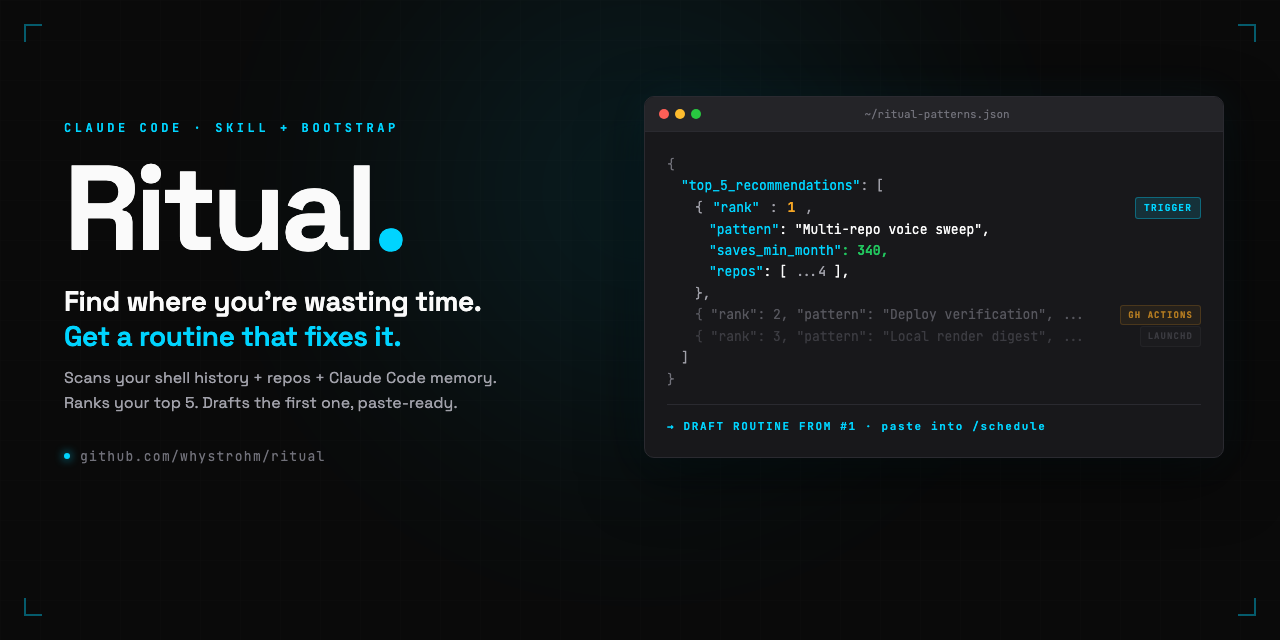
Claude Code scheduled triggers launched a few weeks ago. They are exactly what they sound like: remote Claude Code sessions that run on a cron schedule, in Anthropic's cloud, without you sitting at the keyboard. The feature is obviously powerful. The problem is that most people installing Claude Code for the first time have no clue what their first trigger should be.
I ran into this myself. I stared at the /schedule command for a long time. I knew I had repeated work. The trouble is that the work you actually repeat versus the work that just feels busy is hard to see from inside the work.
So I wrote a scan. Then a skill. Then a playbook of seven routine archetypes. Then I open-sourced all of it under MIT. It's called Ritual. This post is the full breakdown.
Repo: github.com/whystrohm/ritual. Tool page: Ritual in the resources hub.
Part 1: The Scan
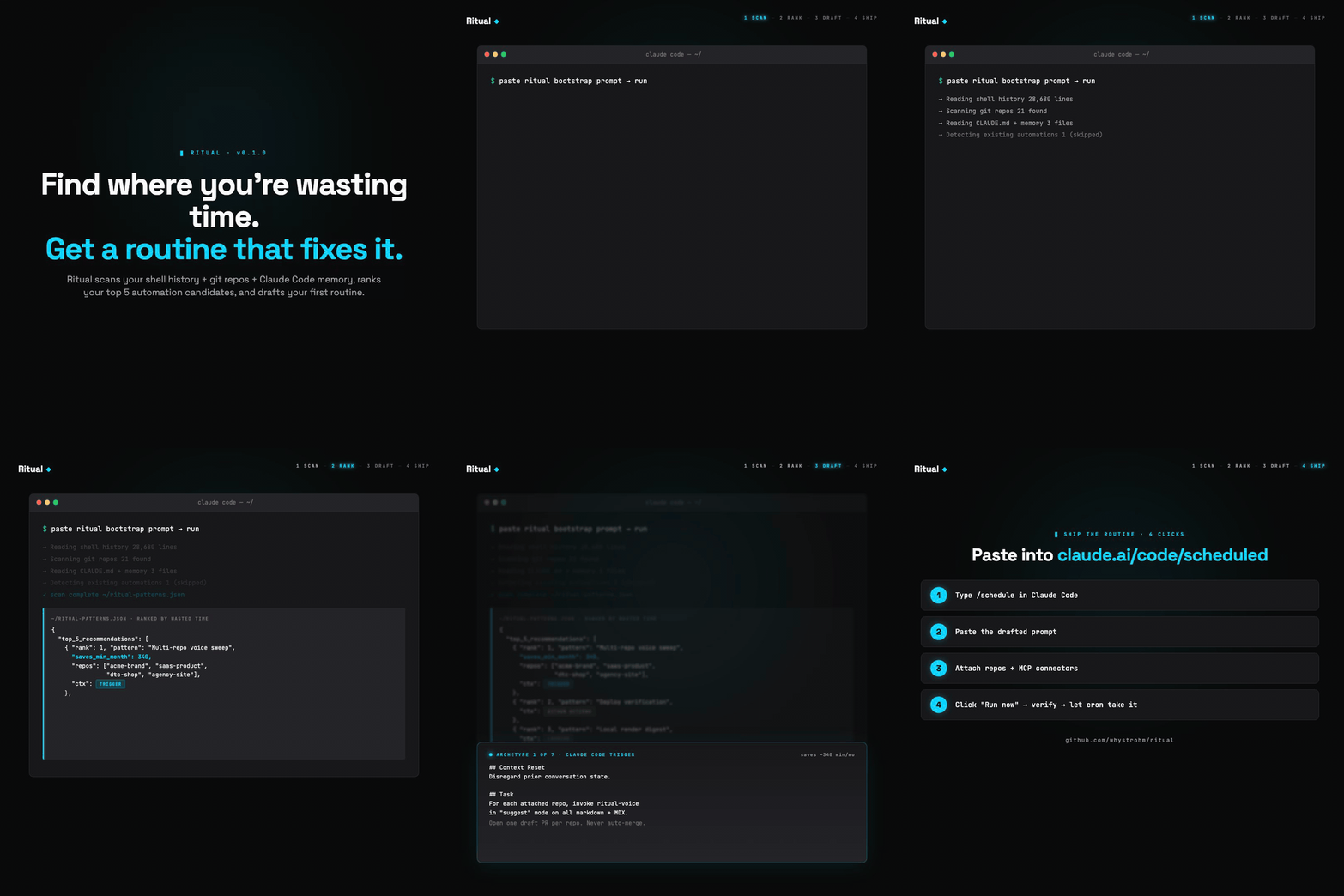
The scan is not a product. It's a paste-in Claude Code prompt. You open Claude Code at your home directory, paste the prompt from docs/bootstrap.md, and five to ten minutes later you have a file at ~/ritual-patterns.json with your top 5 routine candidates ranked.
Here's what the scan actually reads:
- Shell history, both sources. On modern macOS, default zsh writes per-session history to
~/.zsh_sessions/*.history, not to~/.zsh_history. Most scans miss this. Mine reads both. On my machine, most of the real command history was in the per-session files. - Git repos under ~/. Inventoried with last-commit dates, shared folder shapes, and schema overlap across
brand-config.jsonor similar files. - Claude Code memory files.
~/CLAUDE.md,~/.claude/memory/, and any repo-levelCLAUDE.md. Stated intent beats observed behavior. If your memory says "always sync Notion after client deploys," that's a real routine candidate even if it hasn't happened often enough to show up in shell history. - Existing scheduled jobs.
~/Library/LaunchAgents/,crontab -l, and.github/workflows/*.ymlin every repo. The scan lists what already runs and excludes those patterns from recommendations. You don't want "schedule a YouTube audit" to show up when a launchd job already runs one every Monday.
Output: a JSON file with each recommendation ranked by frequency times time cost times feasibility, classified by execution context, and the top one drafted as a full paste-ready trigger prompt with your real repo names in it.
Part 2: The Three Execution Contexts
This is the part that matters for honesty. Not every routine Ritual recommends belongs in a Claude Code scheduled trigger.
| Context | When it fits | Where it lives |
|---|---|---|
| Claude Code trigger | Work on git-hosted repos, runs on a cadence, uses MCP connectors | /schedule or claude.ai/code/scheduled |
| GitHub Actions | Event-driven (on PR open, on push to main, on release) | .github/workflows/*.yml inside the repo |
| Local cron / launchd | Needs local filesystem, local scripts, or local tools | ~/Library/LaunchAgents/ or crontab |
The scan tags each recommendation. If your top pattern is "sweep every content repo for stale copy at 6am Monday", that's a Claude Code trigger, drafted directly. If it's "block PRs that include AI-slop language", that's GitHub Actions, and the scan points you at a workflow example. If it's "aggregate today's Remotion renders into an iMessage digest", that's launchd, and the scan tells you the trigger feature can't do it and hands off to the right tool.
This sounds obvious. It isn't. Most "routine templates" on the internet right now assume every routine fits in a trigger, and they force it. Ritual refuses.
Part 3: The Seven Archetypes
After running the scan against several machines (mine plus a handful of friends testing it), seven recurring shapes emerged. Five are Claude Code triggers. Two belong elsewhere.
- Voice sweep (trigger). Runs
ritual-voiceacross every brand repo, opens draft PRs with fixes. Monday 6am. Most common first recommendation for content operators. - Fact freshness digest (trigger). Walks your config's
provenFactsarray, flags any fact older thanmaxAgeDays. Weekly. Your reminder to re-verify case-study numbers before they quietly go stale. - Dependency and security digest (trigger). Clones each repo, reads lockfiles, opens grouped patch bumps. Flags majors without applying. Skip if Dependabot already covers it.
- Content calendar sync (trigger with Notion or Drive MCP). Pulls the next 7 days from your calendar, checks drafts and assets exist in the attached repo, flags blockers. Sunday evening.
- Inbox triage (trigger with Gmail MCP). Reads unread threads from the last 24 hours, classifies action-required vs informational vs discardable, emits a digest. Weekdays 7am.
- Deploy verification (GitHub Actions, not a trigger). Fires on push to main. Pre-deploy voice lint + llms.txt check + Lighthouse.
- Local filesystem digest (launchd, not a trigger). Needs your Mac's filesystem. Keep it as a local scheduled job and leave it there.
The archetypes are in docs/first-routines.md with the full prompt, cron expression, repos to attach, and MCP connectors needed. Paste-ready. If your scan surfaces a pattern that doesn't match any of these, open an issue with the JSON and I'll add an archetype.
Part 4: ritual-voice (The Bundled Skill)
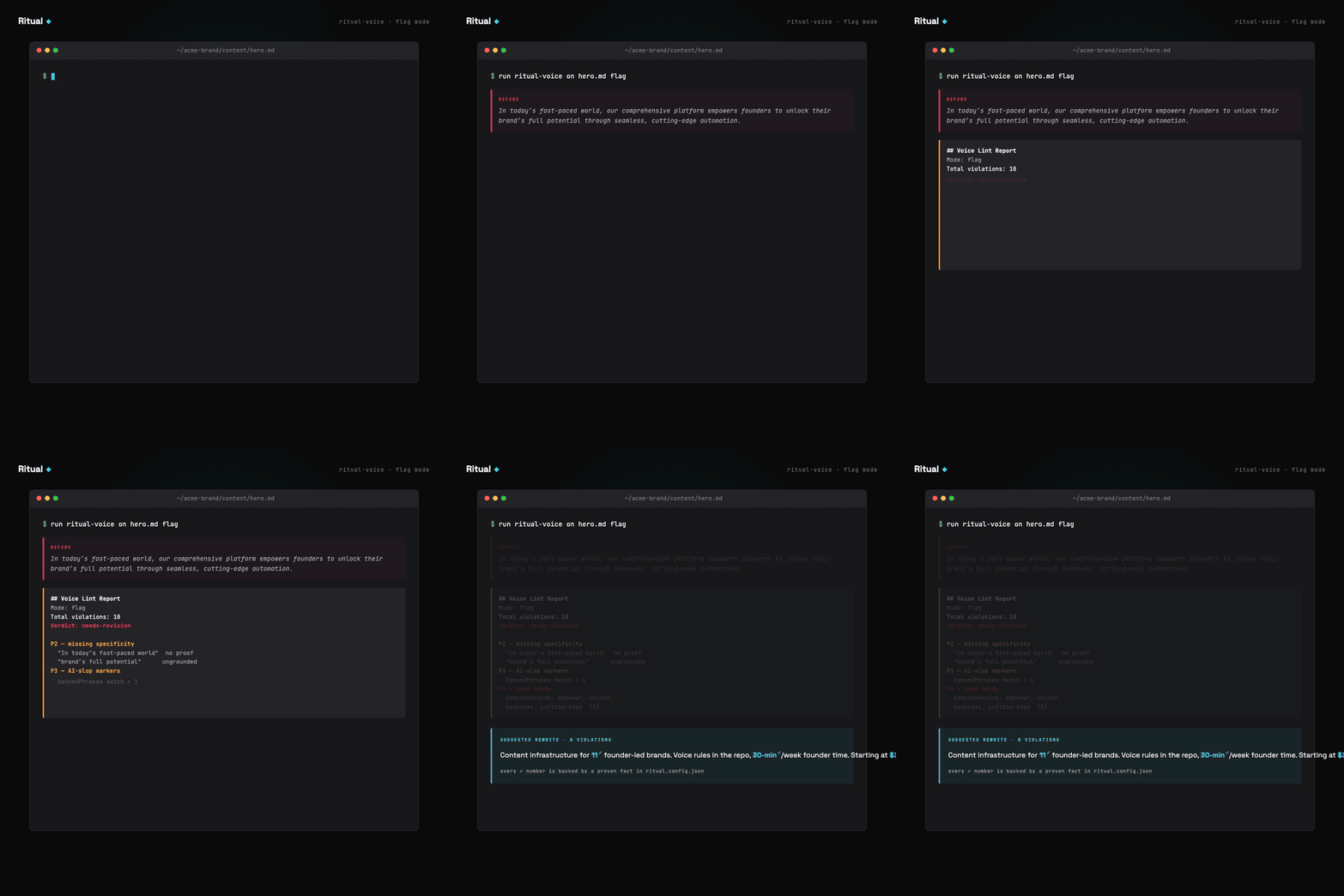
The bundled skill powers Archetype 1 (voice sweep). Six priorities in a deliberate order:
- Stale stats, numeric claims in content that don't match
provenFacts, or facts not re-verified in 30 days. - Missing specificity, "we help founders grow" class of statement. Claims without numbers, proof, or named subjects.
- AI-slop markers, em-dash density, "it's not X, it's Y" construction, "tapestry," "testament to."
- Hype words, comprehensive, seamless, revolutionary, plus whatever you add per brand.
- Name and attribution mismatches, the nickname in one paragraph, legal name in another. Cross-file checks.
- Generic corporate voice, passive headlines, hedging claims, vague benefits.
Three modes: flag (report only), suggest (propose rewrites), fix (apply directly). Scheduled runs default to suggest. Auto-fix never runs unsupervised.
The priority order is the interesting part. Most voice linters lead with style (hype words, passive voice). This one leads with provenance: does the claim have a receipt? A stale number is misleading. A hype word is ugly. Misleading is worse than ugly.
The skill itself has zero brand-specific logic. Everything lives in a ritual.config.json at each brand's repo root. Your config is yours. Mine looks nothing like yours. The skill just reads whatever rules you define.
Part 5: The Four Clicks to Ship a Trigger
When the scan hands you a drafted routine prompt, here's what happens next. No dead zone. Four clicks.
- Type
/schedulein a new Claude Code session (or visit claude.ai/code/scheduled and click "New trigger"). - Paste the drafted prompt. Do not edit it down. The remote agent starts with zero context, so the whole prompt is load-bearing.
- Attach repos and MCP connectors. The draft lists which ones, real GitHub repos by name, real connectors from your claude.ai/settings/connectors. If a connector is missing, connect it first.
- Set the UTC cron, save, then click "Run now" immediately. Do not wait for the schedule. Fire it once manually, review the output, tune if needed. Only trust the cron after a clean manual run.
Full mechanics in docs/how-routines-work.md, what "remote agent" means, how MCP connectors attach, what outputs look like, usage limits per plan, troubleshooting.
What Ritual Will Not Do
Every content tool drifts toward "trust me" marketing. I committed to the opposite. docs/limitations.md is explicit about what Ritual refuses to do:
- It will not write content. It's an audit skill. Rewrites come from
provenFacts, not imagination. - It will not replace an editor. It catches mechanical drift, not strategic problems.
- It will not verify facts against the live internet. The config is the source of truth. Wrong config, wrong audit.
- It will not auto-fix in a scheduled run. Fix mode exists for trusted interactive use. Scheduled triggers stay in suggest mode.
- It will not work well with an empty config. New configs start with
provenFacts: []. In that state, only P3 and P4 fire meaningfully.
The clearer the scope, the more useful the tool. A three-month-old config with forty proven facts catches more than a week-old config with five. Ritual becomes more valuable as your config matures.
Install and Run
Download the .skill file directly:
curl -L https://github.com/whystrohm/ritual/releases/latest/download/ritual-voice.skill -o ritual-voice.skill

# Claude Code → Settings → Skills → Install Skill → select the file
Or run the bootstrap scan first to get your personalized routine recommendations:
cd ~
# Open Claude Code, then paste the prompt from:
# https://github.com/whystrohm/ritual/blob/main/docs/bootstrap.md
Everything is MIT. The repo is github.com/whystrohm/ritual. Issues welcome. Example configs for niches beyond mine are the single most valuable contribution if you want to help.
What This Is Part Of
We also publish four Claude Code skills for brand voice:
- Digital Twin, reverse-engineer how you think and talk, build an AI System Prompt of yourself.
- Content Audit, score your content against a 5-layer framework, get a live rewrite.
- Voice Extract, extract a structured voice profile from any URL.
- Voice Scorer, measure voice drift between your website and social content.
Ritual sits above them. It's the orchestration layer that decides which of those skills (or any other work) belongs on a schedule and drafts the trigger to run them.
The tool page is Ritual in the resources hub. For video, the kit is Shotkit: it plans a video in Claude Code, from brief to checked frames.
Scheduled triggers are the loop from Claude Code for Founders, Episode 6, and the skills they run are Episode 4.
If you want this running in your company without maintaining it yourself, that is the Setup and the Retainer. Or run the free scan on your site first.
Your company film
Want it done for you?
Apply with your company site. If it fits, we make a film in your brand, from your words and material. Watch it before we talk.